DOS ERP

Digital Office Suite — one ERP, every department.

A production-grade PHP & MySQL ERP built in-house at Nexus Code Labs, covering Accounts, Inventory, and HR/Payroll with role-based approvals and audit-ready reporting throughout.

DOS ERP logo What is DOS ERP?

Built for real operations, not a sales demo

DOS ERP (Digital Office Suite) is Nexus Code Labs' own enterprise resource planning system, developed with PHP, MySQLi, jQuery, and Bootstrap, and hosted at nexuscodelab.com/erp. It's actively used to run day-to-day accounting, inventory, and manufacturing operations for a real business — every screen in this page is a genuine screenshot from the live system, not a mockup.

The platform follows a strict internal standard for every module: consistent voucher workflows, a locked TCPDF report format for every printed document, role-based access on every screen, and a full audit trail on every transaction. That discipline is what lets the system scale from a single ledger entry to a full statutory financial statement without the data model ever needing to be re-worked.
17+
Financial Reports
25+
Database Tables
3
Core Modules
100%
Maker-Checker-Approver
nexuscodelab.com/erp/
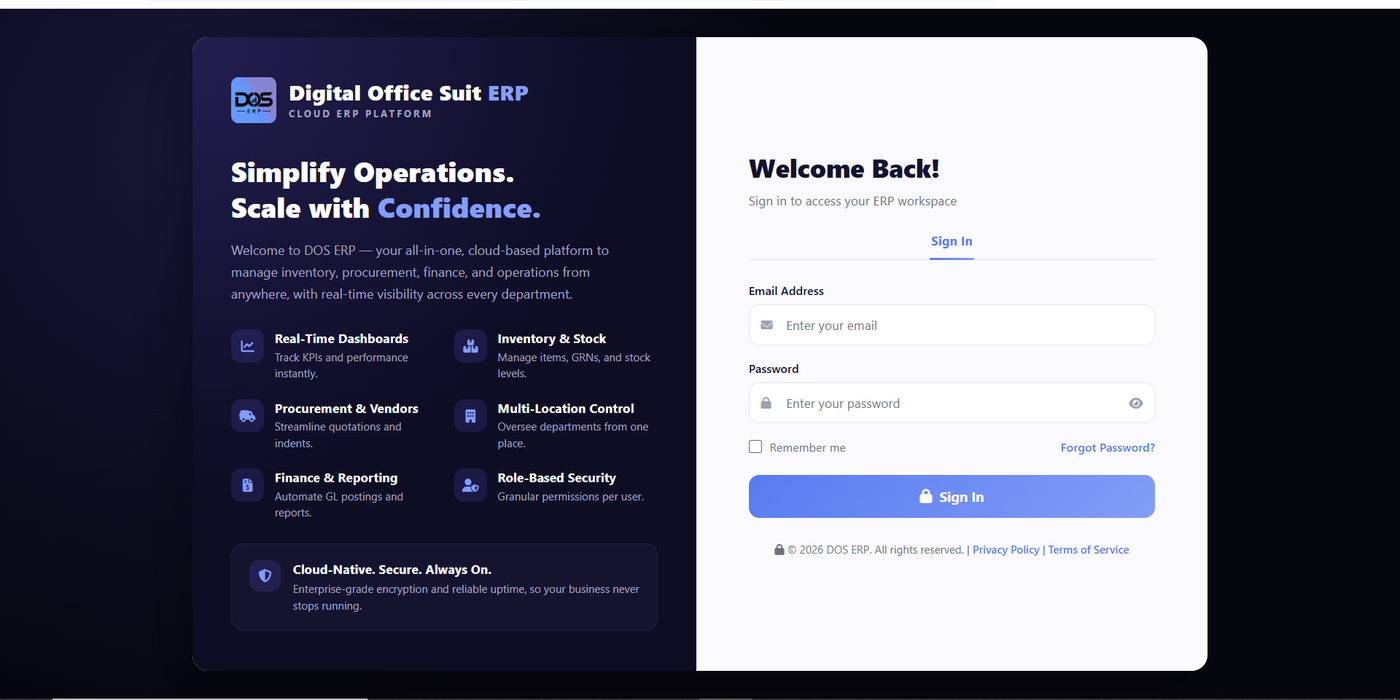
DOS ERP sign-in screen: Digital Office Suite ERP welcome panel listing Real-Time Dashboards, Inventory & Stock, Procurement & Vendors, Multi-Location Control, Finance & Reporting, and Role-Based Security, alongside the login form
Under the Hood

Engineered on a disciplined, auditable standard

Every module shares the same conventions, so the system behaves predictably no matter which screen you're on.

PHP & MySQL Core

Built on PHP, MySQLi, jQuery, and Bootstrap — no framework overhead, full control over every query and screen.

Maker-Checker-Approver

Every voucher type carries its own configurable approval chain, with sort order and signature-on-file per role.

Locked Report Standard

Every printed report and voucher shares one TCPDF layout — logo, criteria line, page numbering, and signature blocks.

Full Audit Trail

A single User_ID on every table plus DB Audit Trail Management means every change is traceable to a person.

Inside DOS ERP

Explore the components

A closer look at the modules that make up the day-to-day operation of DOS ERP.

Overview Dashboard

Business Intelligence Dashboard

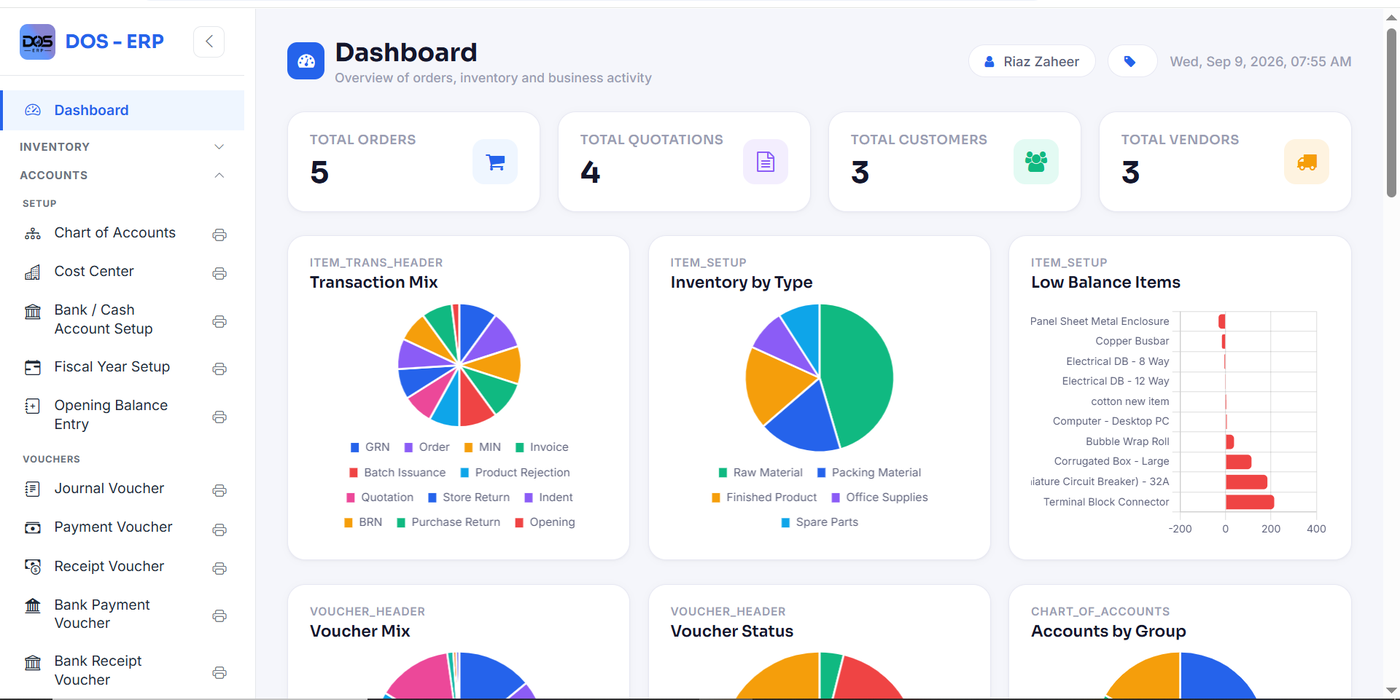
The moment anyone logs in, DOS ERP surfaces what actually matters — total orders, quotations, customers, and vendors as live KPI cards, refreshed against the current database rather than a cached summary.

Below the KPIs, a set of charts break down the transaction mix (GRNs, orders, invoices, vouchers), inventory by type, and — critically — a Low Balance Items chart that flags stock about to run out before it becomes a production problem.

DOS ERP dashboard with KPI cards for total orders, quotations, customers, and vendors, plus Transaction Mix, Inventory by Type, and Low Balance Items charts
Dashboard — KPI cards, transaction mix, inventory-by-type, and low-balance alerts in one view.
Setup Accounts

Chart of Accounts Setup

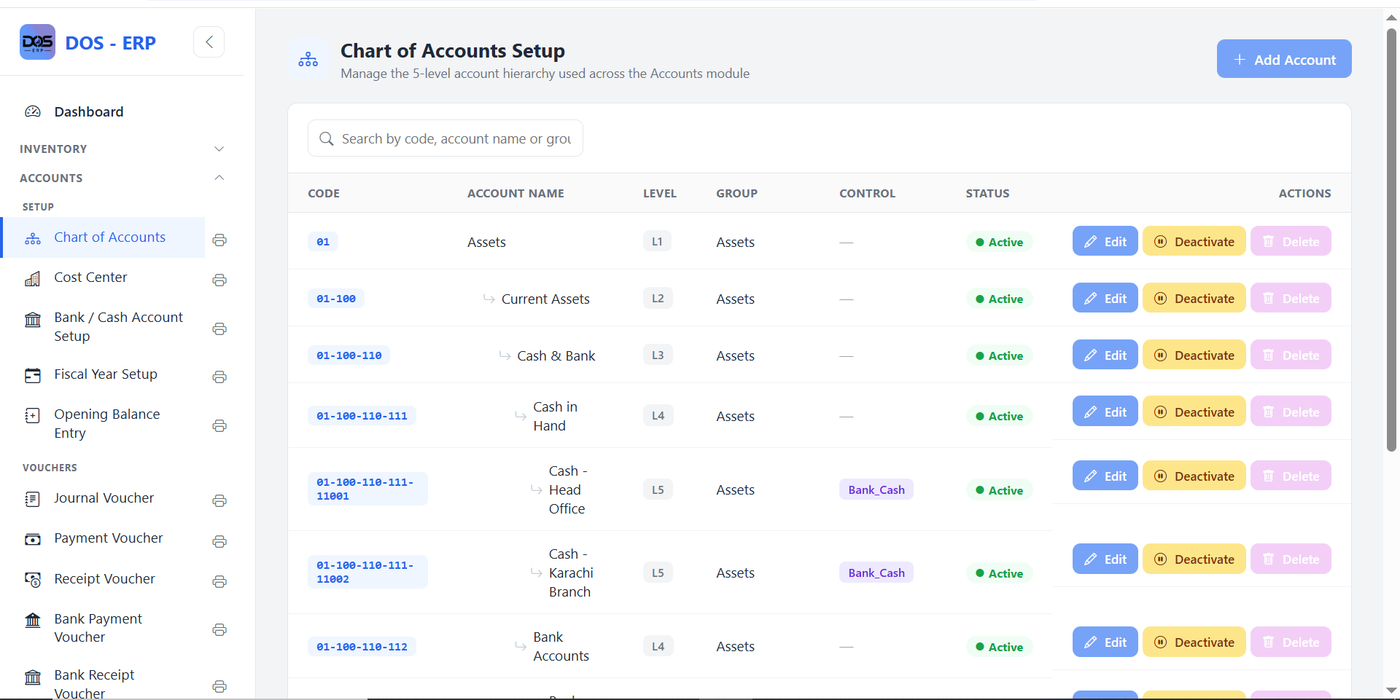
The financial backbone of the system: a full 5-level account hierarchy (Assets → Current Assets → Cash & Bank → Cash in Hand → individual GL codes) used consistently across every voucher, report, and reconciliation screen.

Each account carries a control type — Bank_Cash, for instance — so the system knows automatically which accounts feed bank reconciliation and which stay purely internal, without a single hardcoded rule elsewhere in the code.

Chart of Accounts Setup screen listing a 5-level account hierarchy with code, account name, level, group, control type, and status columns
Chart of Accounts — a 5-level hierarchy (L1–L5) with per-account control types like Bank_Cash.
Reporting Accounts

Financial Reporting Engine

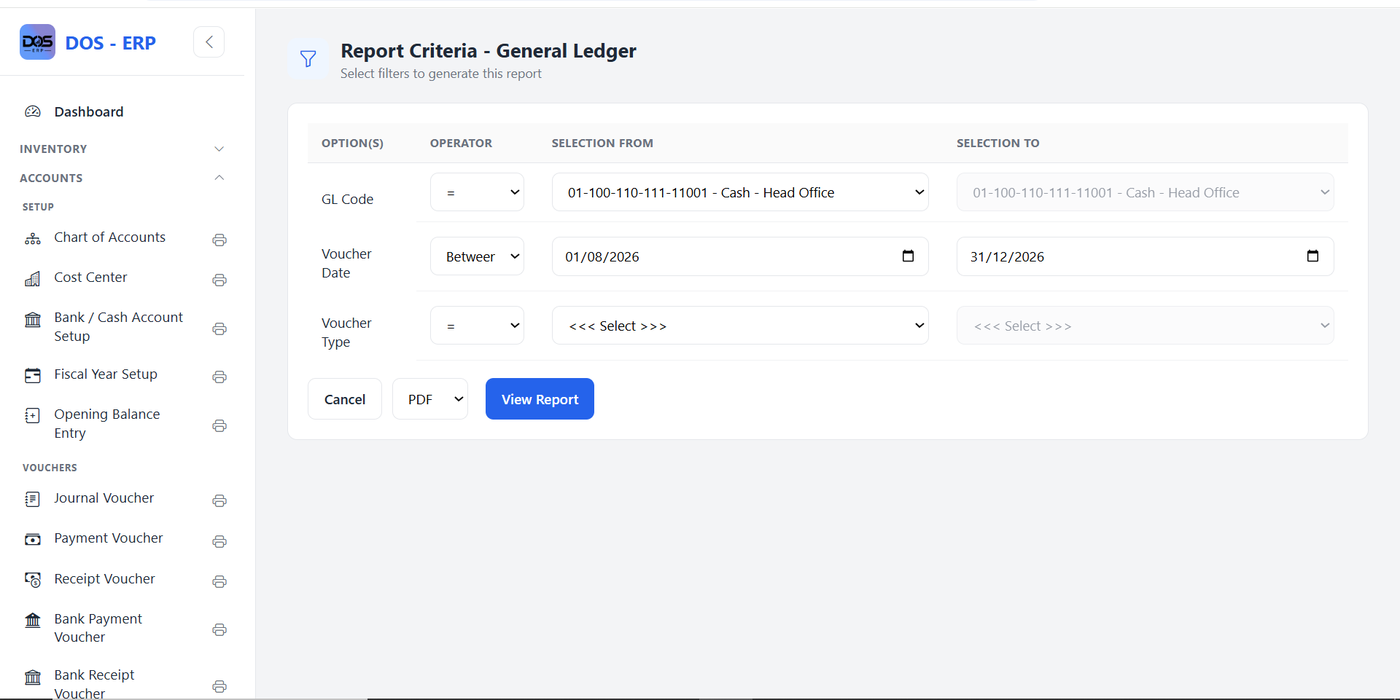
All 17 financial reports in the Accounts module — General Ledger, Trial Balance, Balance Sheet, Profit & Loss, and more — share one criteria screen pattern: pick a GL code, a date range, and any extra filters, then generate straight to PDF or Excel.

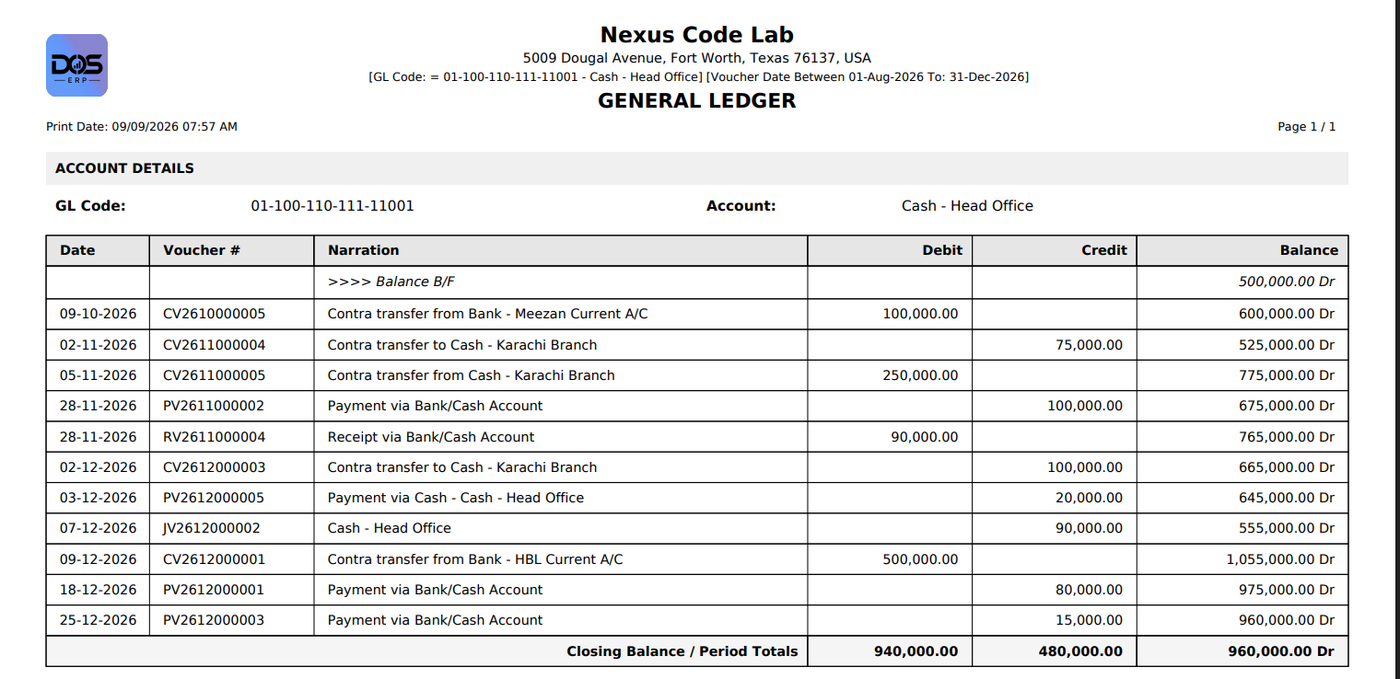
The General Ledger below shows exactly what a partner or auditor receives: opening balance, every posted voucher affecting the account, a running balance, and a closing total — generated on demand, not pre-built.

Report Criteria screen for the General Ledger with GL Code, Voucher Date range, and Voucher Type filters, plus PDF/View Report actions
Report Criteria — General Ledger: filter by GL code and date range before generating.
Generated General Ledger PDF report showing account details, a running balance per voucher, and closing balance totals
The resulting General Ledger — opening balance, running balance, and closing totals.
Cash & Bank Accounts

Bank Reconciliation Statement

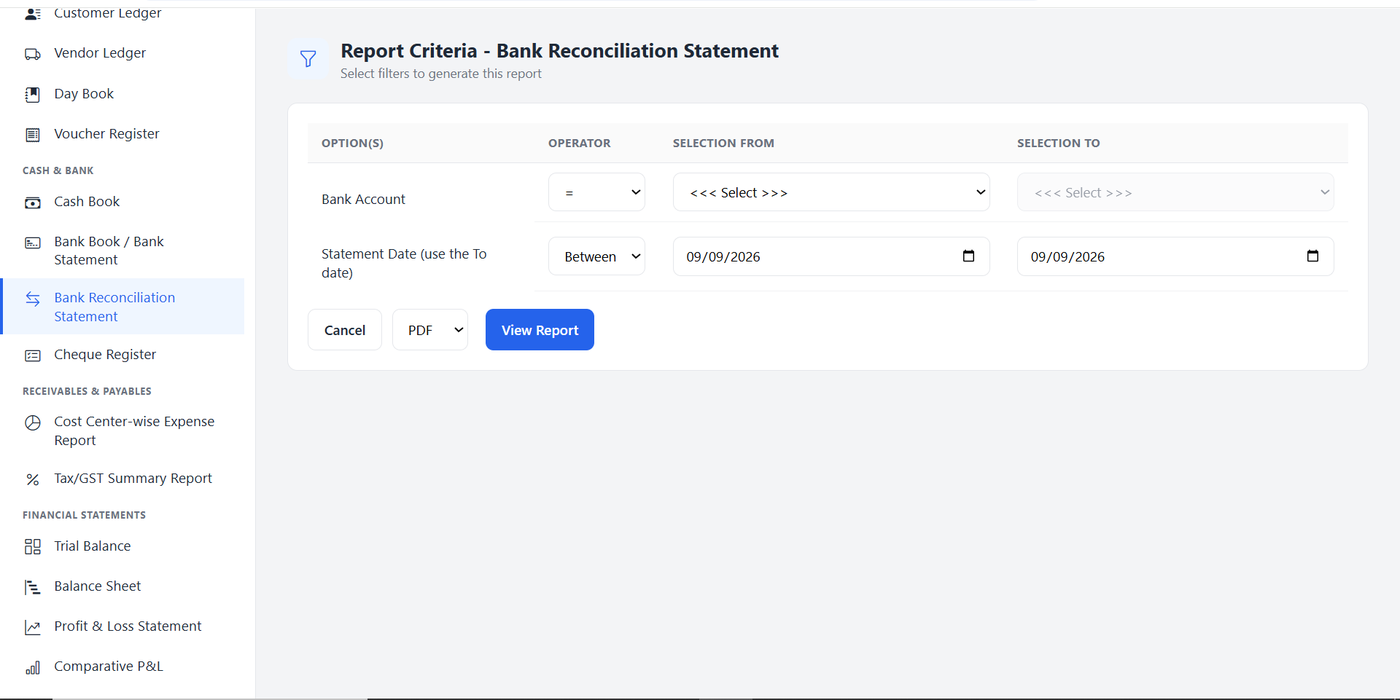
Reconciling book balances against the bank statement is a dedicated report of its own, filtered by bank account and statement date — part of a wider Cash & Bank suite that also includes the Cash Book, Bank Book, and Cheque Register.

Keeping this as a first-class report — rather than a manual spreadsheet exercise — is what makes month-end close fast and defensible.

Report Criteria screen for the Bank Reconciliation Statement with Bank Account and Statement Date filters, part of the Cash and Bank reports menu
Bank Reconciliation Statement — one of the dedicated Cash & Bank reports.
Controls System Utilities

Voucher Approval Authority

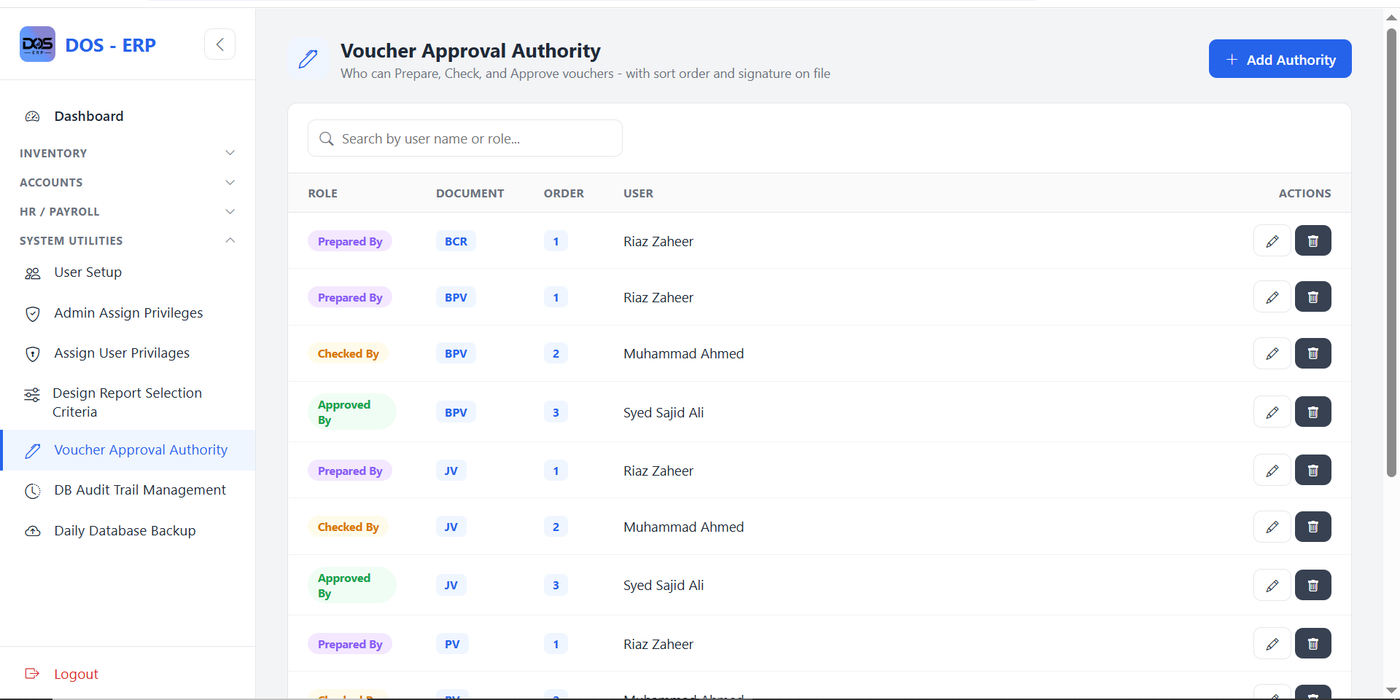
Every voucher type — Bank/Cash Receipt, Bank Payment, Journal, Payment, and more — has its own maker-checker-approver chain, defined once per document type with an explicit sort order for who prepares, who checks, and who signs off.

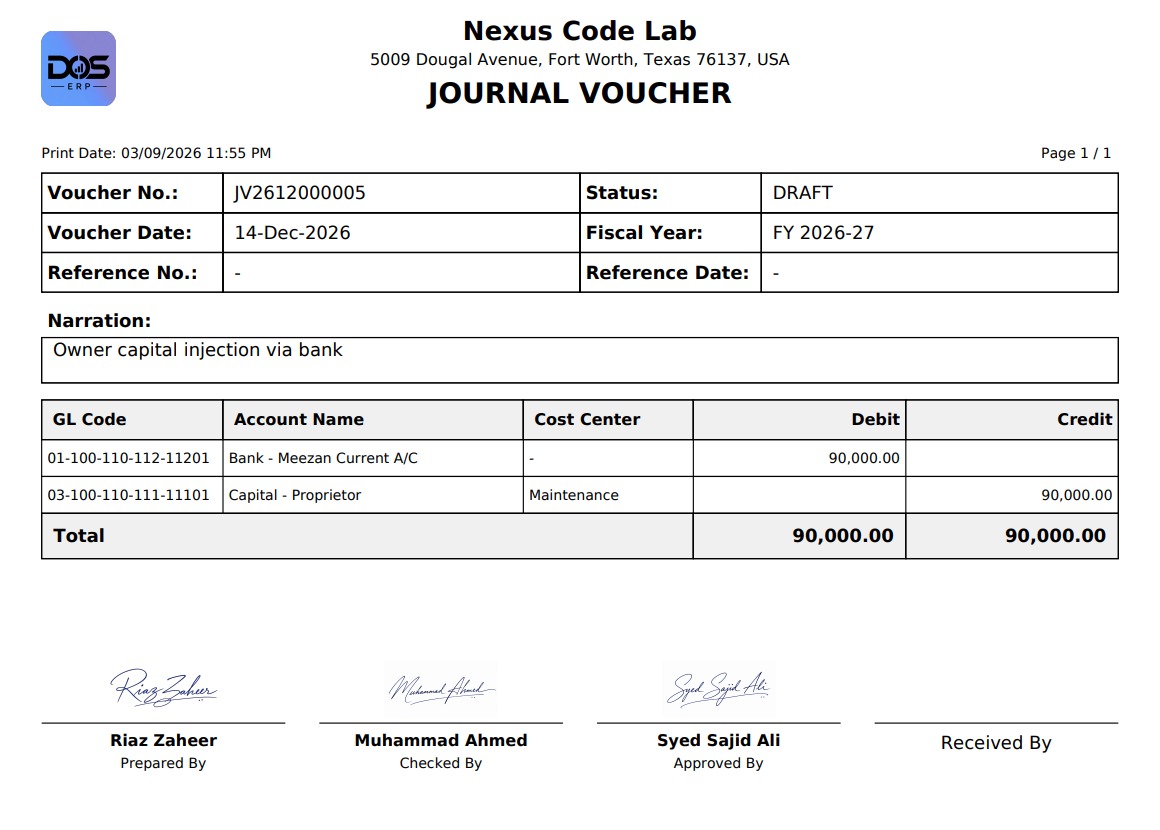
That workflow isn't just configuration: it prints. The Journal Voucher shown here carries three named signature lines — Prepared By, Checked By, Approved By — pulled straight from the approval authority set for that document.

Voucher Approval Authority screen listing roles (Prepared By, Checked By, Approved By) per document type such as BCR, BPV, and JV, with assigned users and sort order
Voucher Approval Authority — a configurable Prepared/Checked/Approved chain per document type.
Printed Journal Voucher document showing GL codes, debit and credit amounts, and three signature lines for Prepared By, Checked By, and Approved By
Journal Voucher print — the approval chain rendered as real signature lines on the document.
Security System Utilities

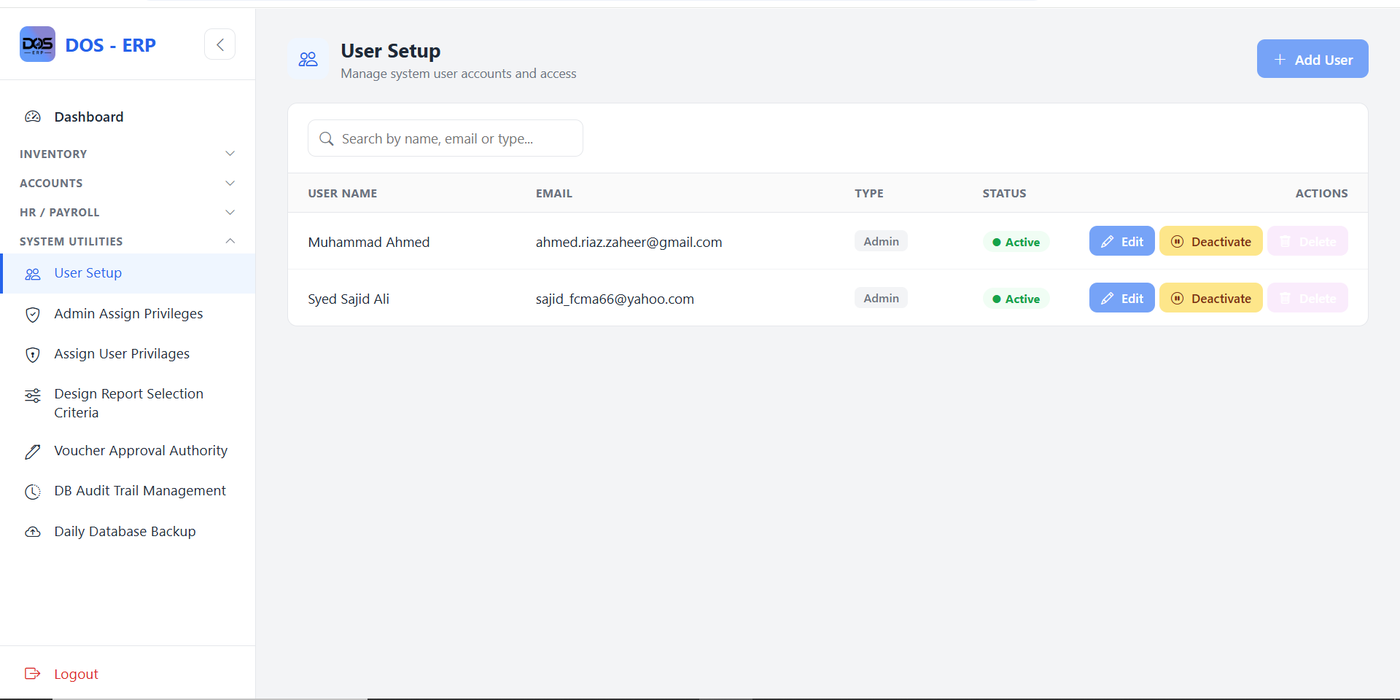
User Setup & Access Control

Alongside User Setup, DOS ERP includes Admin Assign Privileges and Assign User Privileges screens that scope exactly which menus, forms, and actions each account can reach — right down to individual Setup screens.

Combined with DB Audit Trail Management and Daily Database Backup, this gives the system the same access-control and recovery posture you'd expect from a commercial ERP, without depending on a third-party vendor.

User Setup screen listing system users with name, email, account type, status, and edit/deactivate/delete actions
User Setup — manage every system account and its active status from one screen.
Manufacturing Inventory

Batch Card Recipe (Bill of Materials)

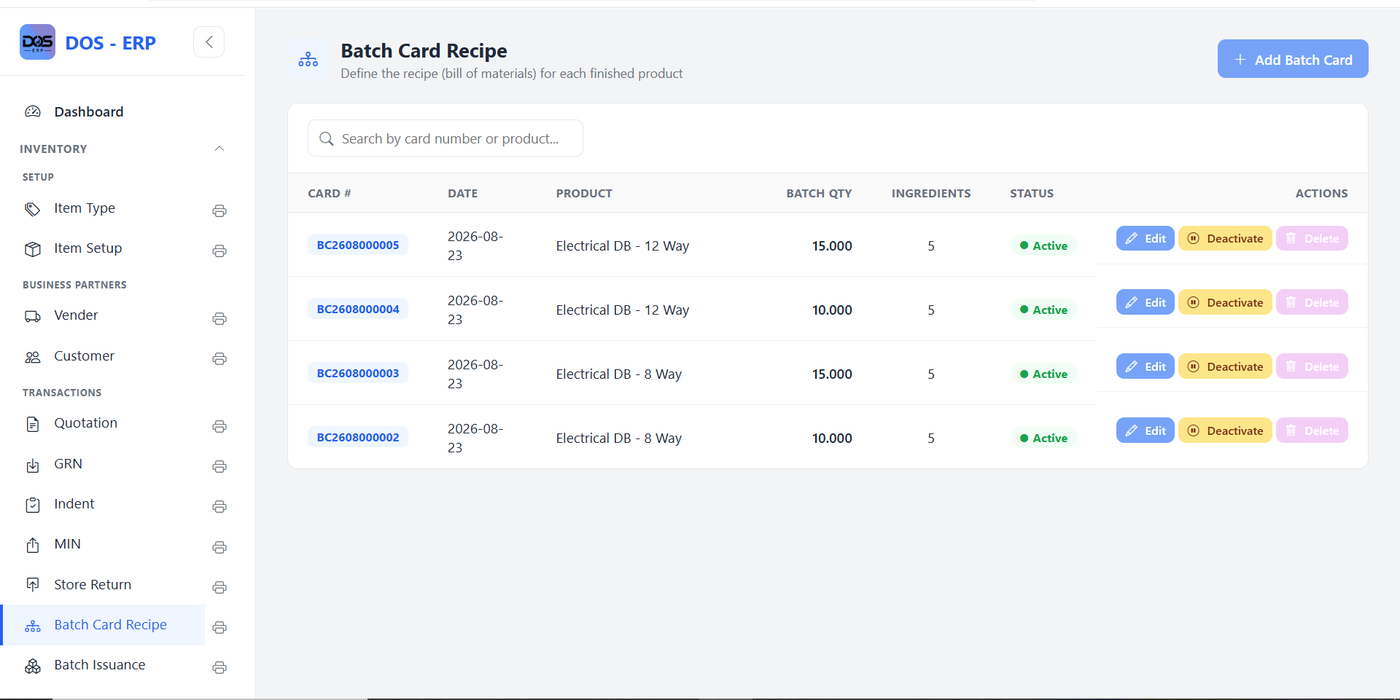
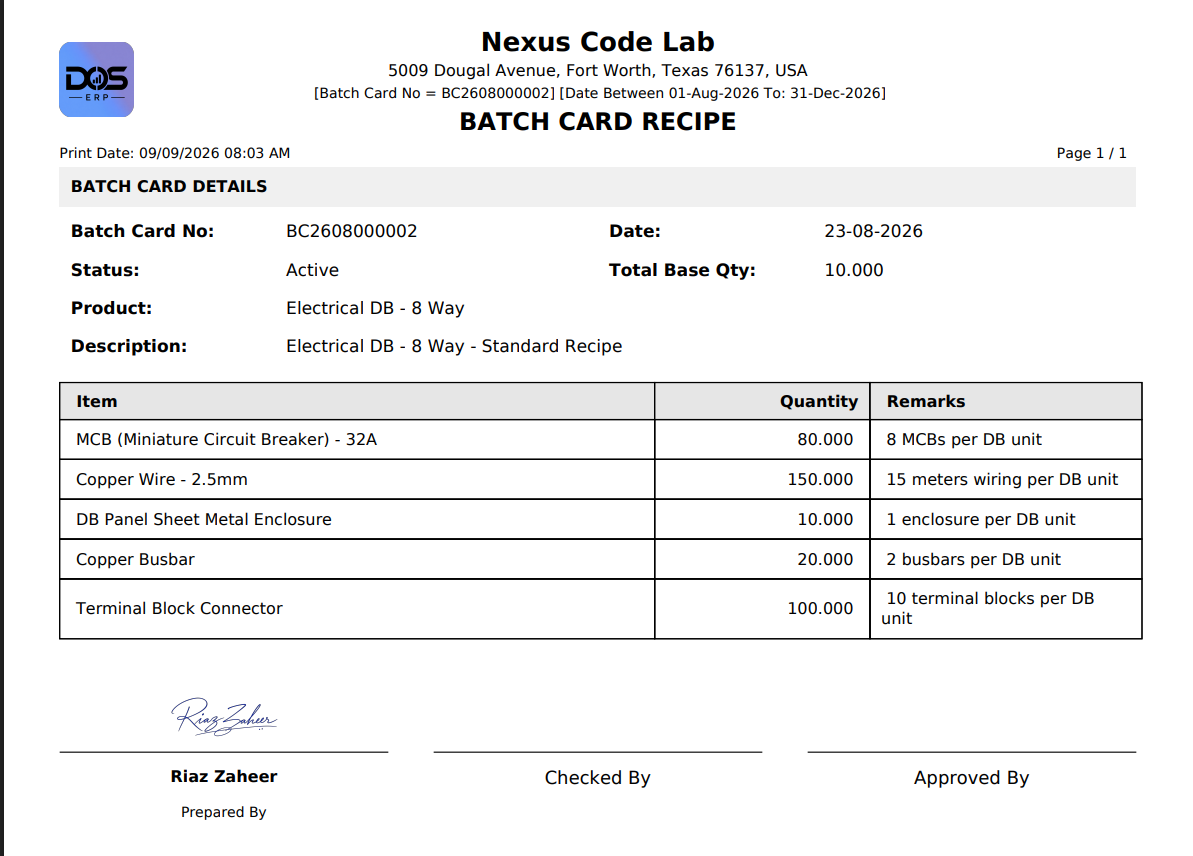
For manufactured items, DOS ERP stores a full recipe — the Batch Card Recipe — defining exactly which raw materials and quantities go into one production batch of a finished product, versioned by batch quantity.

The printed recipe becomes the shop-floor reference: for a batch of 10 Electrical DB - 8 Way units, it lists precisely 80 MCBs, 150 metres of copper wire, 10 enclosures, and so on, each with a plain-language remark explaining the ratio.

Batch Card Recipe list screen showing card number, date, product, batch quantity, ingredient count, and status for several electrical DB products
Batch Card Recipe list — every product recipe, versioned by batch quantity and status.
Printed Batch Card Recipe report listing ingredients, quantities, and remarks for a batch of Electrical DB - 8 Way units, with a signature line for Prepared By
The printed recipe — exact ingredient quantities per batch, ready for the production floor.
Production Inventory

Batch Receipt Note (BRN)

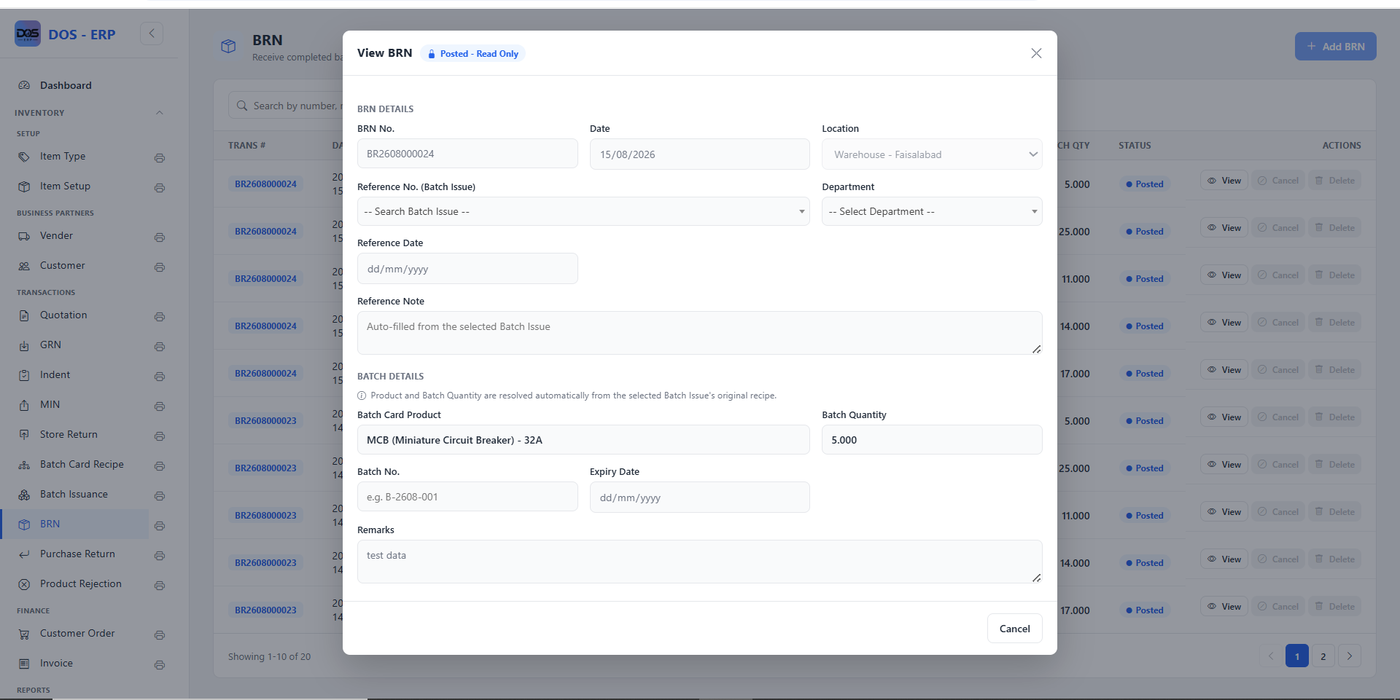
Once a batch is issued for production, the Batch Receipt Note closes the loop: it records the finished quantity actually received back into stock against the original Batch Issue, with the product and expected quantity auto-resolved from that issue's recipe.

Posted BRNs become read-only — visible for reference and audit, but no longer editable — which is exactly the behavior you want once a production run has been confirmed.

View BRN screen in read-only posted mode showing BRN number, date, location, linked batch issue reference, batch card product, batch quantity, and remarks
Batch Receipt Note — production output logged against its original Batch Issue, posted read-only.
Transactions Sales

Sales & Invoicing

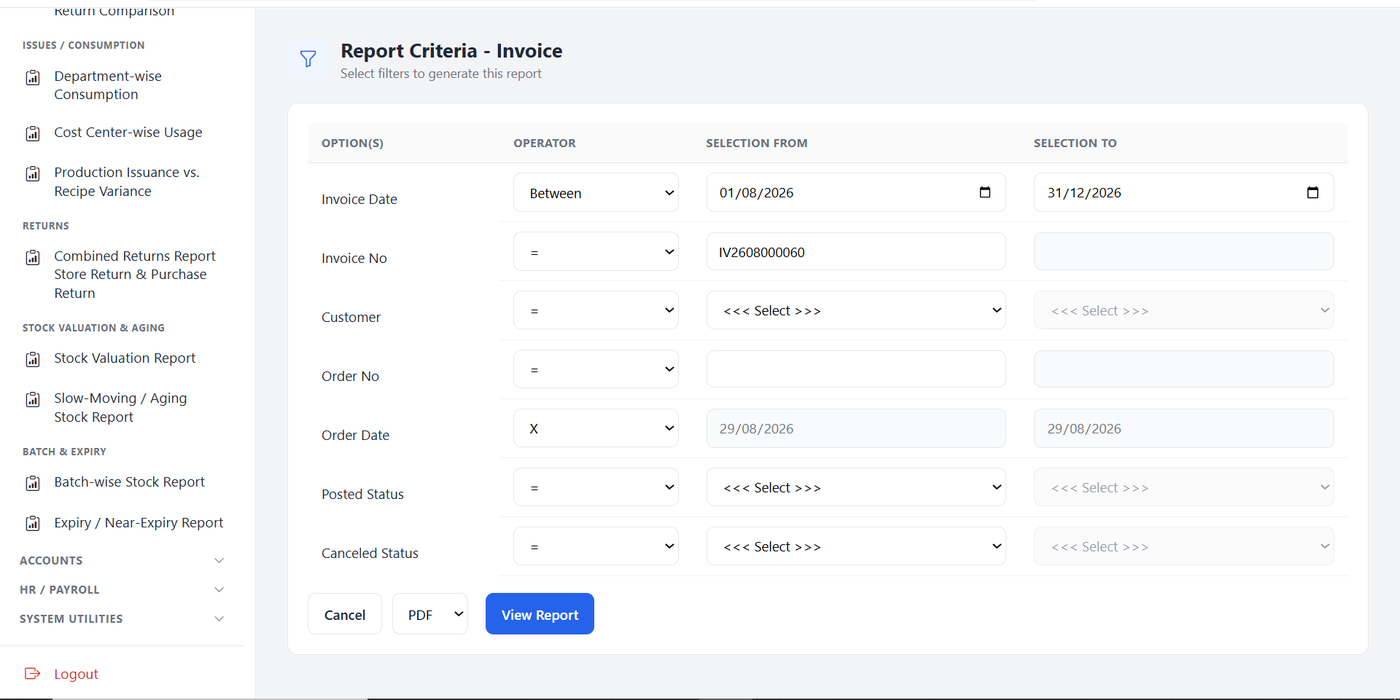
The sales cycle runs Quotation → Customer Order → Invoice, with GST and per-line discounts calculated automatically and the invoice report filterable by customer, order number, and posted or cancelled status.

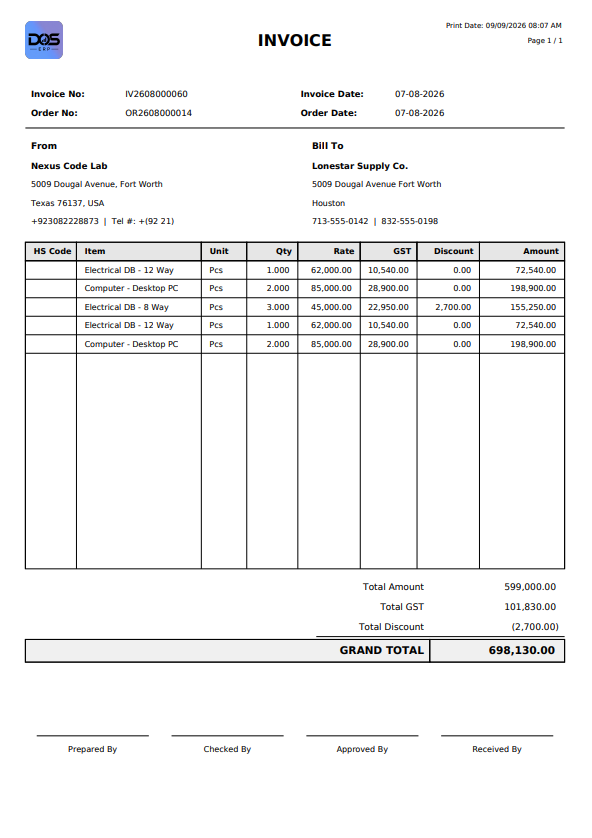
The printed invoice carries the same professional layout as every other DOS ERP document — clean line items, tax and discount breakdown, grand total, and dedicated signature lines for Prepared, Checked, Approved, and Received By.

Report Criteria screen for Invoice with filters for invoice date, invoice number, customer, order number and date, posted status, and cancelled status
Report Criteria — Invoice: filter by customer, order, date range, or status.
Printed invoice document listing line items with HS code, quantity, rate, GST, and discount, ending in a grand total and four signature lines
The printed invoice — itemised GST and discount breakdown down to the grand total.
Workforce HR / Payroll

HR & Payroll — Employee Master

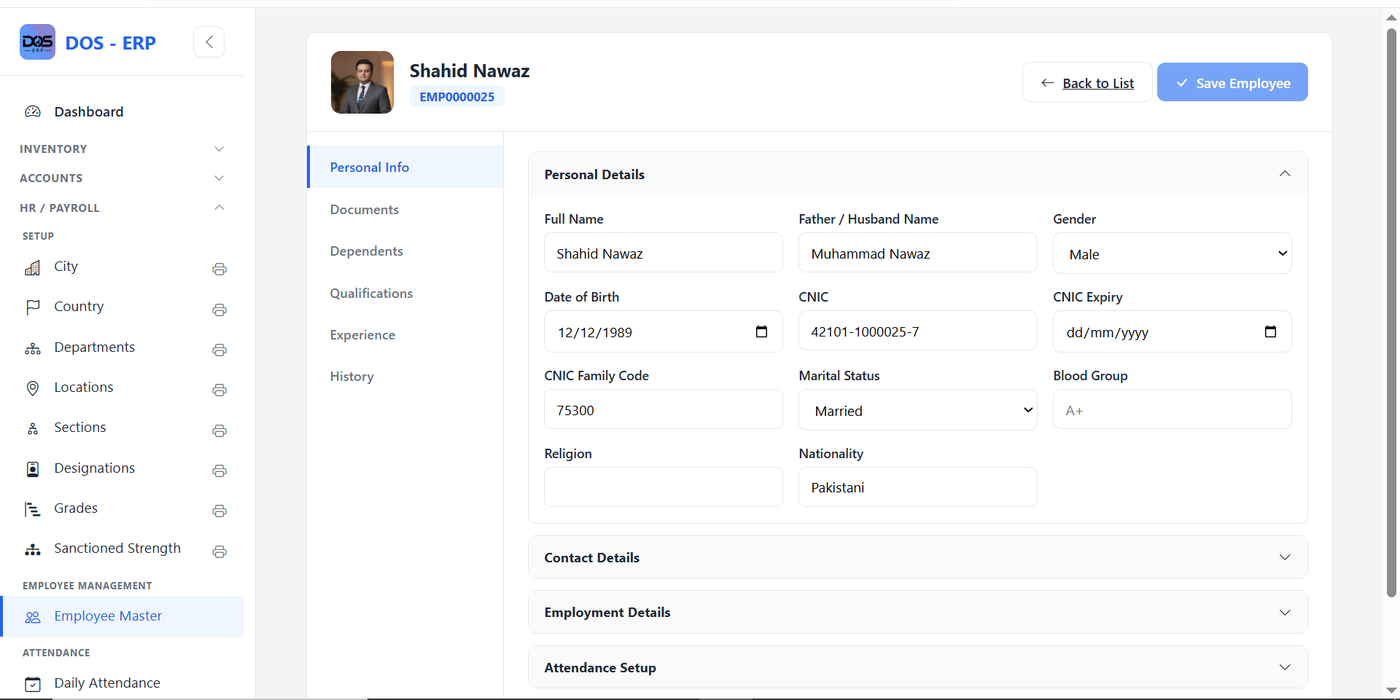
The newest module taking shape in DOS ERP. Employee Master brings every personal, contact, and employment record together in one tabbed profile — Personal Info, Documents, Dependents, Qualifications, Experience, and History — instead of scattering employee data across disconnected forms.

Personal Info opens by default with the employee's photo front and center, alongside CNIC, marital status, blood group, and nationality. Contact Details, Employment Details, and Attendance Setup collapse below it, and one Save Employee button commits every tab together in a single transaction.

DOS ERP Employee Master screen showing an employee profile with photo, personal details (full name, CNIC, marital status, blood group, nationality), and tabs for Documents, Dependents, Qualifications, Experience, and History
Employee Master — a single tabbed profile for personal, contact, and employment records.
Compliance System Utilities

DB Audit Trail Management

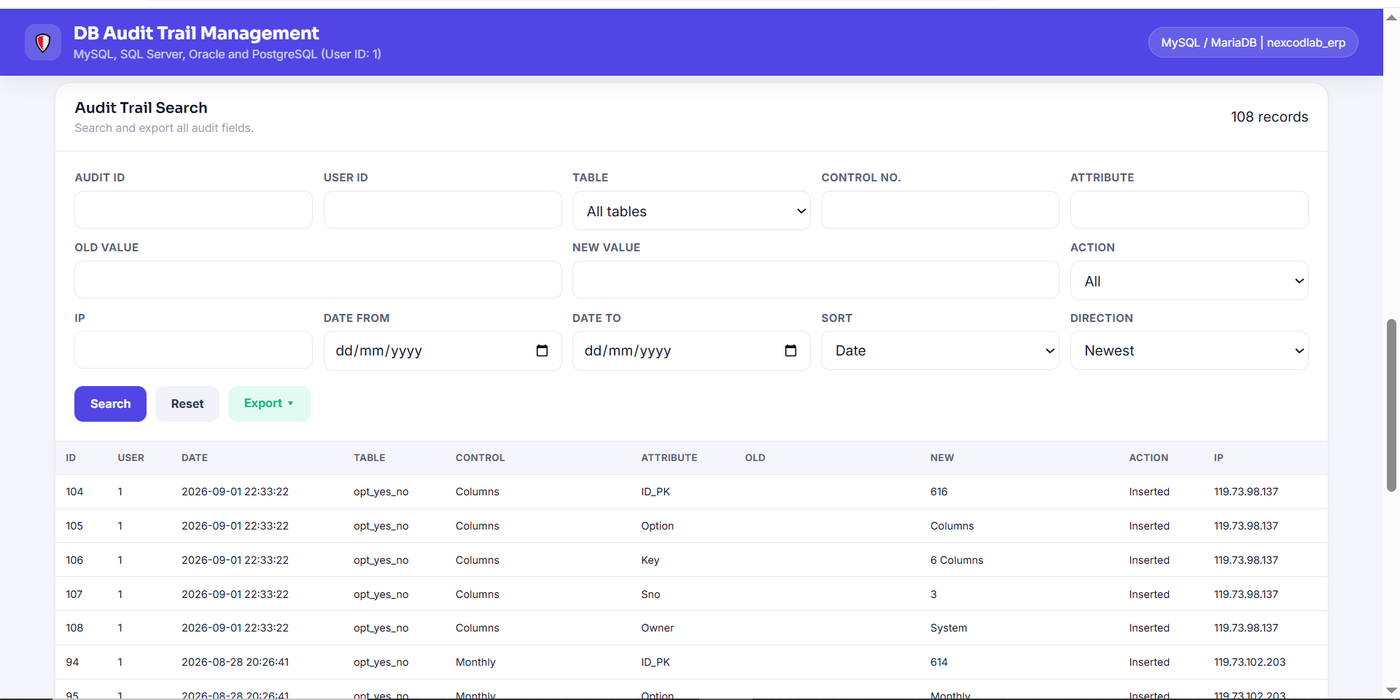
Every insert, update, and delete across the database — MySQL/MariaDB today, with SQL Server, Oracle, and PostgreSQL support built in — is captured at the column level: which table, which record, which attribute changed, its old value, its new value, the user, the timestamp, and the originating IP address.

The Audit Trail Search screen turns that log into an actual investigation tool, searchable by any combination of user, table, control number, attribute, date range, or action — so "who changed this and when" is always a filter away, not a database query someone has to write by hand.

DB Audit Trail Management screen with a searchable log of database changes, showing audit ID, user, date, table, control, attribute, old and new values, action, and IP address for each change
DB Audit Trail Management — every field-level change, searchable by user, table, attribute, date, or action.

Want an ERP
built around your business?

DOS ERP started as an internal tool — we can scope the same discipline, reporting rigor, and approval workflow for your operation.

Talk to us about your ERP View all Services