Introducing DOS ERP: How We Built Our Own Back-Office System
Every software company eventually hits the same wall: the tools you use to run the business don't keep pace with the tools you build for the business. We hit that wall a while back — spreadsheets for accounts, disconnected tools for inventory, no real audit trail on any of it. So we did what we do for our clients: we built our own solution.
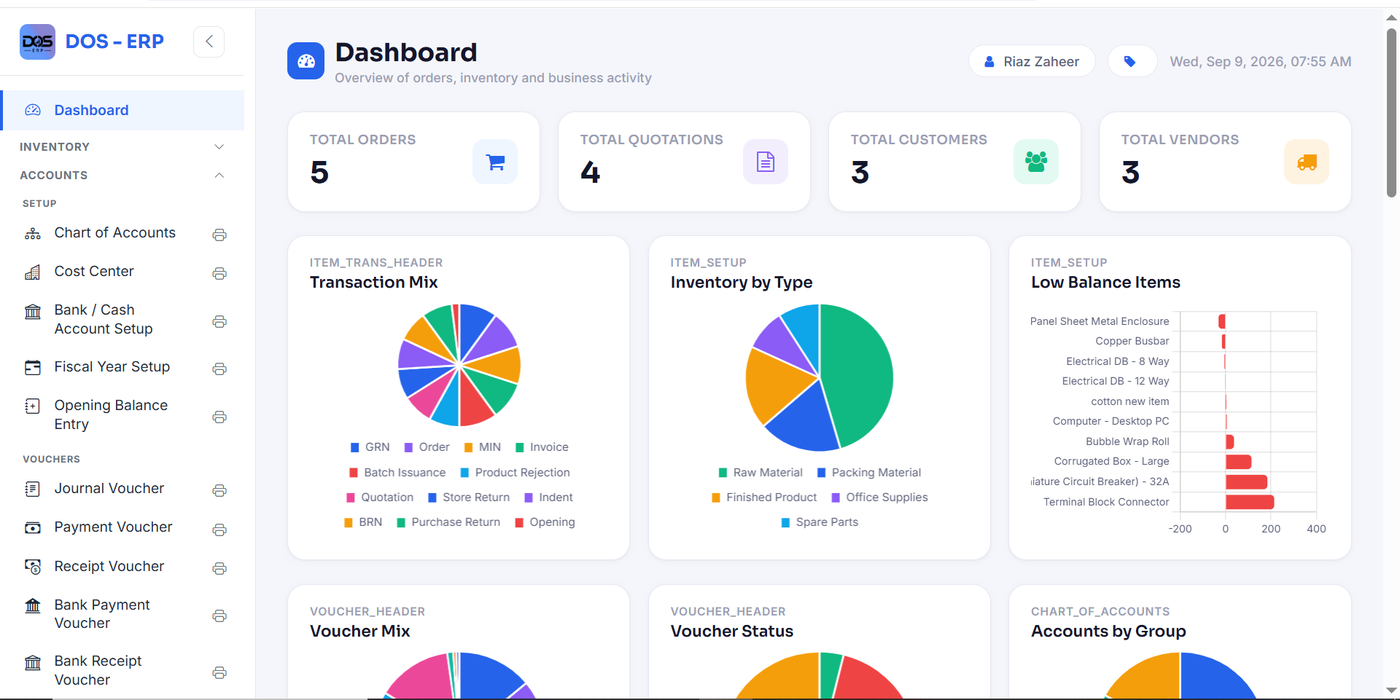
That solution is DOS ERP — the Digital Office Suite. It's not a demo, and it's not a product we built to sell first and use later. It's the actual system running Nexus Code Lab's day-to-day accounting, inventory, and manufacturing operations right now. Every screenshot we show of it on our website is a real screen from the live system.
Why We Built It Ourselves
We could have bought an off-the-shelf ERP. Plenty exist. But most either cost more than made sense for a business our size, or came bundled with features we'd never use and missing the specific controls we actually wanted — particularly around audit trails and approval discipline. When you're a software company, "we'll just build it" is a genuinely reasonable answer, so that's what we did: a production-grade PHP & MySQL platform, built in-house, with no framework overhead standing between us and the database.
One Standard, Every Module
The thing that makes DOS ERP feel coherent instead of like five different tools stitched together is that every module follows the same internal rules:
- Consistent voucher workflows — every transaction type, from a journal voucher to a bank payment, follows the same locked numbering format and the same approval logic.
- A locked TCPDF report standard — every printed report and document shares the same layout: logo, criteria line, page numbering, and signature blocks. Open any report from any module and it looks like it belongs to the same system.
- Maker-checker-approver on everything — no transaction posts without going through its configured approval chain. This isn't optional per-module; it's baked into how the platform works.
- A full audit trail — more on this below, because it's one of the parts we're proudest of.
What's Inside
Accounts. A five-level Chart of Accounts hierarchy, eleven voucher types, and a full financial reporting engine — General Ledger, bank reconciliation, and everything else that a real business's books need, not a simplified subset of it.
Inventory & Manufacturing. Batch Card Recipe (our take on a bill of materials) and Batch Receipt Notes track production from raw material to finished product, tied directly into the same inventory ledger that Sales & Invoicing draws from.
Sales & Invoicing. Quotations, orders, and invoices that connect straight back into Accounts — a sale isn't a disconnected event, it's a transaction the rest of the system already understands.
HR & Payroll. Our newest module, built around an Employee Master screen that holds a complete personal, contact, and employment profile in one tabbed view instead of scattering employee data across separate forms.
User Setup & Role-Based Access. Every user gets exactly the permissions their role requires — nothing more.
DB Audit Trail Management. Every insert, update, and delete across the database is logged at the column level: which table, which record, which field changed, the old value, the new value, who did it, when, and from what IP address. If a number changes, we can always answer who changed it and when — as a filter, not a forensic investigation.
The Numbers
Right now, DOS ERP runs on 17+ financial reports, 25+ database tables, and 3 core modules — with 100% of transactions passing through maker-checker-approver controls before they post. Those aren't marketing numbers; they're just what it takes to actually run a business's books without gaps.
Where This Is Going
DOS ERP started as an internal tool, but the same discipline — consistent workflows, locked reporting, full auditability — is exactly what we bring to client projects too. If you're curious what a tailored ERP built with that same standard could look like for your own operation, explore DOS ERP or get in touch and we'll walk you through it.